
Audi Camera Malfunction Diagnosis in Dubai
A black, blurry, delayed or unavailable camera image does not automatically prove the camera unit has failed. We identify the affected view, follow its power and data path, check the display and control system, and confirm whether coding or calibration is relevant before parts are approved.

What the camera warning means
An Audi camera malfunction can describe a failed picture, a view that is temporarily unavailable, a control-system fault or a driver-assistance function that cannot rely on its camera input. The exact message, affected view and operating condition establish the correct starting point.
A camera is an aid, not a replacement for mirrors, shoulder checks and a clear view around the vehicle. If the reversing or surround image is unavailable, stop the manoeuvre when visibility is uncertain. If a front-camera warning limits a fitted assistance function, follow the dashboard instruction and do not assume the function will intervene.
The visible symptom narrows the fault
The same “camera unavailable” description can come from very different systems. Record whether the problem is permanent or intermittent, whether it affects one view or every view, and what happened immediately before it appeared.
Black or blank screen
Check whether the display changes into camera mode, whether guidelines appear, and whether one camera or the complete system is missing. Power, wiring, communication, switching logic and the camera itself remain separate possibilities.
Blurred or distorted view
Dirt, lens damage, moisture, internal image failure or display processing can change clarity and colour. Cleaning the external lens is a useful first observation, but it cannot repair water entry or an electronic fault.
Surround angle missing
A single front, rear or side view may fail while the remaining cameras still operate. That pattern helps isolate the affected camera, connector, harness branch, mounting position or configuration.
Warning after repair
Windshield, bumper, tailgate, mirror, battery or body work can alter a connector, mounting position, voltage state or calibration requirement. The recent repair history should be checked before another part is ordered.
Which Audi camera is affected
Audi model names do not identify one universal camera system. Equipment changes with model year, platform, trim, options and market specification, so the vehicle and installed hardware must be confirmed before testing or ordering parts.
Reversing camera
Usually provides the rear view when reverse is selected. A fault may involve the camera, tailgate or boot-lid harness, connector, switching command, image path, control unit or display.
Surround-view cameras
Front, rear and side cameras are combined to create several manoeuvring views. One misplaced, damaged or unavailable camera can disturb an individual angle or the stitched image.
Driver-assistance camera
A forward-facing multifunction camera can support fitted assistance features. A warning here is not the same as a reversing-camera picture fault, and glass position, camera mounting and calibration may matter.
MMI and display path
The camera may be capable of producing a feed while a display, control or communication fault prevents the driver from seeing it correctly. The complete route must be tested.
Trace the image before replacing parts
A camera unit sits inside a chain. The repair should follow the point where that chain stops working instead of treating the final screen message as a parts verdict.
Lens and housing
Inspect contamination, scratches, impact, seal condition, moisture and whether the camera sits correctly in its mount.
Power and ground
Confirm stable electrical supply and return under the condition that produces the fault. Low voltage can create several electronic warnings.
Harness and connectors
Check terminal fit, damage, corrosion, water entry and harness movement near tailgates, bumpers, mirrors or previous repair areas.
Data and control
Review communication with the relevant camera and parking or assistance controllers, including stored status and event context.
MMI image output
Confirm that camera switching, display operation and processing behave correctly rather than assuming the screen proves camera failure.
Setup and calibration
Check whether the installed part, mounting position or previous work requires coding, parameterization, adaptation or calibration.
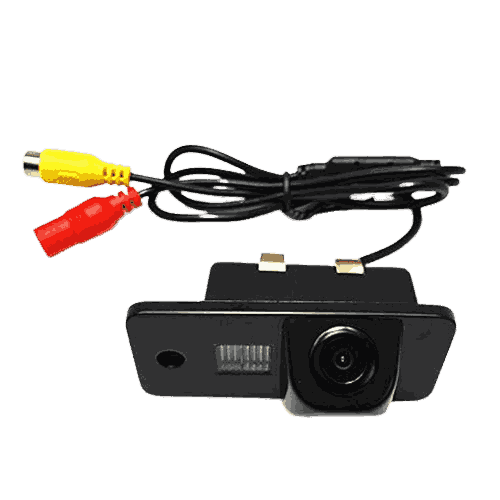
What can stop the camera feed
The cause can be optical, mechanical, electrical or configuration-related. A useful diagnosis connects the observed picture with physical inspection and control-system evidence.
Dust, road film or cleaning residue can reduce clarity without creating an internal camera failure.
Water entry can cloud the image, corrode terminals or create a fault that appears after washing.
Impact or body work can move a camera or distort the bracket that establishes its field of view.
Repeated movement at a tailgate or repaired bumper area can expose an intermittent conductor or connector fault.
Weak supply or ground can interrupt the feed and may accompany other unrelated electronic messages.
A controller, MMI path or communication problem can make a working camera appear unavailable.
A replacement camera or module may need the correct part identity and vehicle-specific setup.
A camera that is secure and communicating can still require calibration after relevant mounting or glass work.
How an Audi camera fault is diagnosed
The sequence protects useful evidence and separates a straightforward image obstruction from a circuit, controller or calibration concern.
Record the event
Save the exact warning, failed view, weather, temperature, gear selection and whether the fault changes after restarting.
Identify the system
Use the VIN, equipment and installed part information to establish which cameras and controllers belong to the vehicle.
Scan before clearing
Read relevant modules, fault status and event data. A stored code directs testing but does not automatically name the failed part.
Test the path
Inspect the lens, mount, wiring and connectors, then verify supply, ground, communication and image operation as relevant.
Verify the repair
Confirm every affected view, switching behaviour, warnings and any required setup under the conditions that caused the complaint.
| Observed behaviour | Useful first checks | What it does not prove | Likely repair boundary |
|---|---|---|---|
| Rear image is completely black | Reverse request, camera supply, tailgate harness, connector, communication and display switching | That the rear camera unit is definitely internally failed | Camera circuit, harness, controller or display diagnosis |
| Image is cloudy after washing | External residue, lens surface, housing seal, visible internal moisture and connector area | That cleaning alone will solve water entry | Cleaning, sealing assessment, housing or camera decision |
| One surround-view angle is missing | Affected camera feed, mount, local wiring, connector and stored system faults | That every camera or the complete controller needs replacement | Local camera branch or configuration work |
| Guidelines are absent or incorrect | Steering data, camera configuration, controller status, recent part replacement and calibration history | That the camera lens itself is damaged | Control data, coding, setup or calibration |
| Fault began after windshield or body work | Part position, mounting geometry, disturbed connectors, system identity and required calibration procedure | That an unrelated new camera has coincidentally failed | Repair-area inspection and evidence-based setup |
| Picture is normal but parking tones fail | Ultrasonic sensor operation, obstruction, wiring and parking-aid controller | That the working image confirms the entire parking system | Continue to parking-sensor diagnosis |
Swipe the table sideways to compare every column.
Preserve intermittent evidence
Do not clear the fault memory or disconnect the battery simply to see whether the message disappears. An intermittent camera complaint can depend on temperature, tailgate movement, washing, reverse selection or another control unit waking up. Record the original status and reproduce the condition safely before disturbing connectors. After repair, the same views and trigger conditions should be checked again. A cleared warning is useful only when the image remains stable, related controllers communicate normally and any required setup has completed for the correct part and vehicle configuration.
Repair follows the failed layer
Calibration is not a cure for damaged wiring, and camera replacement is not a cure for a display fault. The approved work should name the failed layer, any setup required and the checks included after repair.
Cost and time depend on the fitted system, access, damage, part source, programming requirements and whether calibration conditions can be met. A reliable quotation follows identification and testing.
Suitable where external contamination or a visible obstruction explains the poor image and no deeper fault remains.
Repair terminal fit, damaged conductors, sealing and strain relief where testing isolates the interruption. The affected movement or moisture condition should be reproduced safely.
Correct physical damage or position when the camera cannot retain the field of view required by the system. Collision-related damage may need related body alignment evidence.
Use the correct application when internal camera failure is confirmed. Fitment, connector, part identity and post-install setup must match the vehicle.
Continue diagnosis beyond the camera when the feed, switching or communication evidence points toward processing, control or MMI operation.
Perform only the procedures required for the installed component and repair event. Confirm prerequisites, complete the process and check that the original warning does not return.
Heat, dust and recent work matter
Environmental conditions do not diagnose the failed part, but they help reproduce an intermittent complaint. Tell the workshop if the problem appears only when the vehicle is hot, after washing, during a dusty journey or immediately after another repair.
High cabin and exterior temperatures can expose a weak connection, supply issue or electronic fault that is absent when cool.
A dirty external lens can reduce image quality. Persistent haze after careful cleaning requires inspection rather than abrasive treatment.
A fault after washing can direct attention toward damaged sealing, a wet connector or prior body repair near the camera.
Windshield, bumper, mirror, tailgate and battery work can change mounting, connections, voltage state or setup requirements.
Related Audi diagnostic routes
This page owns camera image-feed faults and the diagnosis needed before camera repair or calibration. Use the related page when the main symptom belongs to another system.
Audi camera malfunction FAQs
Why is my Audi reversing camera screen black?
A black screen can involve the camera, its power or ground, a connector, tailgate wiring, communication, camera switching, a controller or the MMI display path. Whether guidelines or other views remain visible helps narrow the starting point.
Can a dirty camera cause a malfunction message?
Dirt and residue can make the image unclear and can limit systems that depend on a usable view. Cleaning may restore visibility, but a stored electrical, communication or calibration warning still needs its own diagnosis.
Why does only one surround-view camera fail?
Each view has its own camera, position and local connection before the feeds are combined. A single missing angle can therefore point toward that camera, its mounting, connector, harness branch or configuration rather than the complete system.
Can an MMI fault look like a camera failure?
Yes. The camera can produce a feed while switching, processing, communication or display operation prevents it from appearing correctly. Testing should confirm where the image path stops.
Does an Audi camera need calibration after replacement?
It may, depending on the camera function, model, installed part and repair procedure. Identification comes first because reversing, surround-view and front driver-assistance cameras do not all use the same setup process.
Can windshield replacement affect the front camera?
Where a front camera is mounted at the windshield, glass specification, bracket position, camera installation and the applicable repair procedure can affect its operation. Calibration requirements should be checked for the exact vehicle and work performed.
Are Audi parking sensors and parking cameras the same?
No. Cameras provide images, while ultrasonic parking sensors measure nearby objects and create distance warnings. They may share a display or controller, but their components and diagnostic paths are different.
Is it safe to drive with an Audi camera malfunction?
Do not rely on an unavailable camera or assistance function. Use mirrors and direct observation, follow the exact dashboard instruction and avoid a manoeuvre when you cannot confirm the area is clear. Other severe warnings or unsafe vehicle behaviour require separate assessment.
Can low battery voltage cause camera warnings?
Low or unstable voltage can affect several electronic controllers and may create communication or availability messages. Voltage should be tested rather than assumed to be the cause, especially when only one view fails.
What changes Audi camera repair cost?
Cost depends on the fitted camera system, access, whether the fault is optical, physical, electrical or control-related, the required part, programming and calibration. A final quote should follow vehicle identification and diagnosis.
Send the camera fault details
Include the Audi model, year, exact message, failed camera view and any recent windshield, bumper, mirror, tailgate, battery or body work.